
Reserving Counselling Rooms and Group Study Rooms
Pasila's Counselling rooms can be reserved Mon-Fri at 08.00-21.00. The Pasila library group study rooms can be reserved Mon-Fri at 08.00 - 20.00.
Please note that if the library group study room is not occupied within 10 minutes of the start of the reservation, the room will be available to others.
Both the counselling and the library group study rooms in Pasila can also be reserved on Saturdays at 08.00 - 15.00. The Saturday reservations can only be made via email, at [email protected]. For the weekend revervations to Counselling rooms should be made by Thursday of the same week.
1. On the Peppi student’s desktop top navigation, select ”Calendar” > ”Reservation System”.

2. Move to the date where you wish to make a reservation. You can use the Move to date function or the arrow buttons on its left side.

3. Paint the time slot you want to book in the calendar.

4. New Reservation window opens. Fill out the necessary information.

- Subject: Write the reason for the reservation (e.g., group study) here. NB! All the information on a reservation is public and can be seen by other students and the staff.
- Time: Choose the start time and the end time of your reservation.
- Reserved for: Your name is shown here as a default. Do not remove it.
- If you are creating a reservation for multiple people, you can also add the names of the other students here. This way they can see the reservation on their calendars and have the right to edit it.
- If you want the other participants to be able to see the reservation on their calendars, but do not wish to give them the right to edit it, you can add their names to the field Other participants.
- Rooms and Resources: Choose the counselling room that you want to reserve. Use the Search rooms tool (by clicking on the magnifying glass icon) to find a room that is available at the time you have chosen.
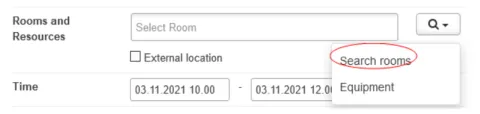
- Find rooms window opens. Write “Pasila PA” on the Campus field to see the free counselling rooms or library group study rooms on the chosen campus [NB. Counselling rooms are only available in Pasila]. Check that the box next to Room is available on selected time” has been selected.
- Click on the Search button and scroll down to see the search results.

- Choose the room you want to reserve by clicking on the + button. Find rooms window closes.

5. Click ”Save”. You do not have to fill out the other information on the New Reservation window.