
Calendar
You can access MyNet's calendar from the top navigation pane by choosing "Calendar" and then "Reservation System".
Above the calendar, you can search for and select resources (class rooms, implementations…) and view their schedules.
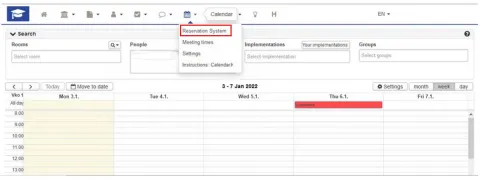
By choosing "Your implementations", all the implementations you have enrolled for AND your enrollment is accepted will be displayed in the calendar.
You can move to a certain date on the calendar by selecting "Move to date" on the top right corner of the calendar. There are also "Month", "Week" and "Day" buttons, which allow you to change the calendar view accordingly.
Calendar settings
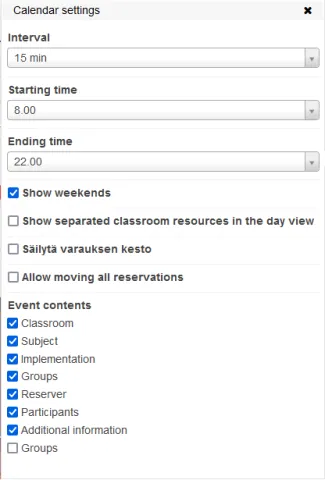
Calendar settings let you choose what the calendar shows. You can edit the calendar view settings by clicking on the Settings button on the right-hand side above the calendar.
When an implementation, class or other reservation is cancelled, the teacher can send a cancellation message to the students from the reservation system. If you are linked to the reservation (e.g. enrolled to the implementation), the cancellation message will be sent to your Haaga-Helia Myy-email address.